next-yak
Documentation and Playground, hosted at yak.js.org


next-yak is a build-time CSS-in-JS library powered by a Rust SWC plugin. Write styled-components syntax, get zero-runtime CSS extraction and full React Server Components compatibility.
Works with Next.js (Webpack & Turbopack), Vite (7+, including Vite 8 with OXC), and Storybook. Any Vite-based framework works out of the box, including react-router, TanStack Start, and more.
Production-proven: next-yak is sponsored and used in production by Digitec Galaxus, the largest e-commerce platform in Switzerland, across thousands of styled components, delivering measurable improvements in Core Web Vitals.
Features
- Multi-Framework: First-class support for Next.js (Webpack & Turbopack), Vite 7+ (react-router, TanStack Start, ...), and Storybook
- Build-Time CSS: Extracts CSS at compile time with zero runtime overhead
- React Server Components: Works seamlessly with both Server and Client Components
- Cross-File Imports: Import constants, mixins, and selectors from
.yakfiles and other modules, works across all bundlers - Standard CSS Syntax: Write familiar CSS with full nesting, keyframes, and media query support
- Integrates with Atomic CSS: Combines with utility-first frameworks like Tailwind CSS
- TypeScript First: Fully typed props, theme context, and cross-file selectors
- Lightweight Runtime: Minimal footprint, just swaps CSS class names based on props
- Minimal Dependencies: Only 8 dependencies in total (including transitive ones)
Compatibility
| next-yak | Next.js | Vite | react | swc_core |
|---|---|---|---|---|
| 9.x | >= 16.1.0 | >= 7.0.0 (9.1+) | 19.x | 56.0.0 |
| 8.x | >= 16.0.0 | - | 19.x | 45.0.1 |
| 7.x | >= 15.4.4 | - | 19.x | 38.0.1 |
| 6.x | >= 15.4.1 | - | 19.x | 27.0.6 |
| 5.x | >= 15.2.1 | - | 19.x | 16.0.0 |
| 4.x | >= 15.0.4 | - | 19.x | 5.0.1 |
| 3.x | 15.x | - | 18.x / 19.x | 3.0.2 |
| 2.x | 14.x | - | 18.x / 19.x | 0.279.0 |
Installation
npm install next-yak
Getting Started
Next.js
See a live stackblitz demo or try our stackblitz starter kit
Works out of the box with both Webpack and Turbopack, no configuration changes needed.
- Add next-yak to your
next.config.ts:
import { withYak } from "next-yak/withYak";

const nextConfig = {
  // your next.js config
};

export default withYak(nextConfig);
- Start styling:
import { styled } from "next-yak";

const StyledDiv = styled.div`
  color: #333;
  padding: 16px;
  background-color: #f0f0f0;
`;

function HomePage() {
  return <StyledDiv>Hello, next-yak!</StyledDiv>;
}

export default HomePage;
Vite
Since v9.1.0, next-yak supports Vite 7+ (including Vite 8 with OXC/Rolldown). Any Vite-based framework works: vanilla Vite, react-router, TanStack Start, and more.
// vite.config.ts
import { defineConfig } from "vite";
import react from "@vitejs/plugin-react-swc";
import { viteYak } from "next-yak/vite";

export default defineConfig({
  plugins: [viteYak(), react()],
});
See the full Vite setup guide.
Storybook
The storybook-addon-yak addon enables next-yak in Storybook 10+ with both Vite and Webpack builders.
npm i -D storybook-addon-yak
See the full Storybook setup guide.
More Examples
Dynamic Styles
Dynamic Styles will only toggle the css class during runtime:
import { styled, css } from "next-yak";

const ToggleButton = styled.button`
  ${(props) =>
    props.$active
      ? css`
          background-color: green;
        `
      : css`
          background-color: lime;
        `};
  color: white;
  padding: 10px 20px;
`;
Dynamic Properties
Dynamic Properties use custom properties (aka css variables) under the hood to extract the CSS at built time but modify properties at runtime:
import { styled } from "next-yak";

const ProgressBar = styled.div`
  width: ${(props) => `${props.$percent}%`};
  height: 20px;
  background-color: #3498db;
  transition: width 0.3s ease-in-out;
`;

const ProgressBarContainer = styled.div`
  border: 1px solid #ccc;
`;

const ExampleComponent = () => {
  const progress = 75; // You can dynamically set this value

  return (
    <ProgressBarContainer>
      <ProgressBar $percent={progress} />
    </ProgressBarContainer>
  );
};
Targeting Components
In next-yak, you can target other components directly using CSS selectors as long as they are in the same file:
import { styled, keyframes } from "next-yak";

const flip = keyframes`
  from { transform: rotateY(0deg); }
  to { transform: rotateY(360deg); }
`;

const Glow = styled.div`
  /* Add your Glow component styles here */
`;

const Text = styled.span`
  display: inline-block;
  ${Glow}:hover & {
    animation: 1.5s ${flip} ease-out;
  }
`;

const ExampleComponent = () => {
  return (
    <Glow>
      <Text>This text will flip on hover.</Text>
    </Glow>
  );
};
Nesting
next-yak supports CSS nesting out of the box.
Performance
next-yak was validated across many thousands of real-world users at Digitec Galaxus:
- >20% faster navigational LCP
- >15% reduced SSR latency
- >10% faster INP
Read more in the Digitec Galaxus blog post.

How it works
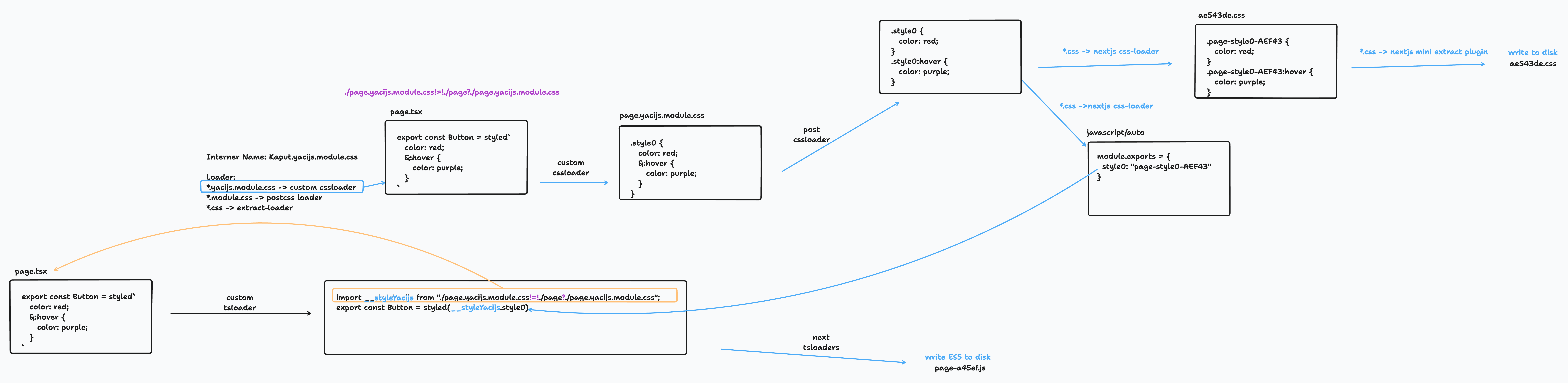
next-yak uses a Rust-based SWC plugin to extract CSS at build time. The extracted CSS is processed through the bundler's native CSS pipeline (PostCSS for Webpack, Lightning CSS for Turbopack and Vite), ensuring consistency between your CSS files and CSS-in-JS.
Atomic CSS
next-yak ships with atomic css support
So you can use tailwind out of the box without additional configuration.
import { styled, atoms } from "next-yak";

// Mixing tailwind with custom styles
const Icon = styled.p`
  ${atoms("font-bold")}
  @supports (initial-letter: 2) {
    initial-letter: 2;
  }
`;

// Apply tailwind classes conditionally
const Button = styled.button`
  ${({ $primary }) =>
    $primary
      ? atoms(
          "bg-blue-500 hover:bg-blue-700 text-white font-bold py-2 px-4 rounded"
        )
      : atoms(
          "bg-transparent hover:bg-blue-500 text-blue-700 font-semibold hover:text-white py-2 px-4 border border-blue-500 hover:border-transparent rounded"
        )}
`;
Build Time Constants
The downside of dynamic properties is that they require inline style attributes. While this is not a problem for most cases, we can't use them for media queries.
next-yak allows you to define build time constants which can be used in your styles:
import { styled } from "next-yak";
import { breakpoints, spacings } from "./constants.yak";

const Container = styled.div`
  padding: ${spacings.md};
  ${breakpoints.md} {
    padding: ${spacings.lg};
  }
`;
| Feature | Code | Yak Constant files |
|---|---|---|
| File Extension | .js, .jsx, .tsx, etc. |
.yak.js, .yak.jsx, .yak.tsx, etc. |
| Runs at | Runtime (Node or Browser) | Compile time (Bundler) |
| Side effects | ✅ | 🚫 |
| Yak Features | All (styled, css, ...) |
🚫 |
Yak shaving
While trying to get next-yak to work properly we stumbled across several bugs. Thanks for merging our PRs and fixes in Next.js, webpack, PostCSS, and more ❤️
- https://github.com/vercel/next.js/pull/51115 (fix inline matchResource
!=!) - https://github.com/vercel/next.js/pull/53796 (fix inline matchResource
!=!) - https://github.com/css-modules/postcss-modules-local-by-default/pull/64 (fix css nesting)
- https://github.com/css-modules/postcss-modules-local-by-default/pull/72 (fix css nesting)
- https://github.com/css-modules/postcss-modules-local-by-default/pull/78 (add cssmodules-pure-ignore)
- https://github.com/css-modules/postcss-modules-local-by-default/pull/85 (add cssmodules-pure-no-check)
- https://github.com/vercel/next.js/pull/62644 (upgrades postcss-modules-local-by-default for css nesting)
- https://github.com/webpack-contrib/mini-css-extract-plugin/pull/1084 (fix: improve esModule exports)
- https://github.com/vercel/next.js/pull/62639 (enable esmodule optimizations for css modules)
- https://github.com/vercel/next.js/pull/62733 (Minify post css class names in production)
- https://github.com/vercel/next.js/pull/64551 (fix lightningcss-loader)
- https://github.com/vercel/next.js/pull/77321 (add cssmodules-pure-no-check)
- https://github.com/webpack/webpack/pull/19012 (CSS Order without side effects)
- https://github.com/swc-project/swc/issues/3934 (Browser SWC Plugin support)
- https://github.com/parcel-bundler/lightningcss/issues/889 (add cssmodules-pure-no-check)
- https://github.com/QwikDev/qwik/pull/8351 (fix virtual CSS module resolution in dev SSR)
- https://github.com/vercel/next.js/pull/89600 (expose this._compilation to webpack loaders in Turbopack)
- https://github.com/vercel/next.js/pull/89901 (exempt data URL CSS from Pages Router global CSS restriction)
- https://github.com/webpack/mini-css-extract-plugin/pull/1162 (fix: use matchResource for importModule)
Acknowledgments
Massive kudos to:
- @sokra: For guiding us through the webpack module and loader APIs
- @kdy1: For his support while rewriting our Babel plugin as a blazing fast SWC Rust WASM plugin
- @samcx: For his great help to merge features into Next.js
Special thanks to the contributors and the inspiring projects that influenced next-yak:
- Styled-Components: For pioneering the styled syntax and redefining styling in the React ecosystem
- Linaria: For its innovative approach to zero-runtime CSS in JS
- Emotion: For pushing the boundaries of CSS-in-JS
- Vanilla Extract: For its focus on type-safe, zero-runtime CSS
- Tailwind CSS: For its exceptional atomic CSS approach
License
next-yak is licensed under the MIT License.
Contributing
Contributions are welcome!
The contributing guide helps you get started with setting up the development environment and explains the development workflow
Feel free to reach out with any questions, issues, or suggestions!


